Scottish Owned, 100% British Based WhatsApp Us Book a Repair

Swollen Phone Battery: Warning Signs and What to Do

Battery safety2 min readMrFix Edinburgh

Key takeaways

  • A lifting screen or bulging back can mean a swollen battery
  • Stop charging it straight away
  • Never press, puncture or remove it yourself
  • A battery replacement usually fixes the problem

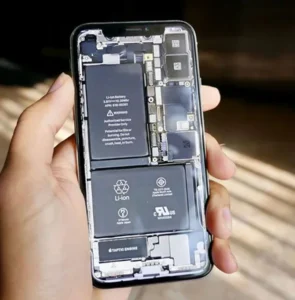
Lithium-ion batteries can swell as they age or if they are damaged. A swollen battery is not something to ignore. It can crack your screen or back glass, and in rare cases it can become a safety risk.

Warning signs of a swollen battery

  • The screen is lifting away from the frame on one side
  • The back glass or cover is bulging or cracked without a drop
  • The phone rocks when placed flat on a table
  • The phone gets unusually hot
  • Battery life has suddenly become very poor

What to do straight away

  1. Stop charging the phone.
  2. Power it off if you can do so safely.
  3. Do not press on the bulge or try to push the screen back into place.
  4. Do not puncture or remove the battery yourself.
  5. Keep the phone somewhere cool and away from anything flammable.
  6. Book a check as soon as possible.

Why do batteries swell?

As batteries age, chemical changes inside can produce gas, which makes the cell expand. Heat, physical damage and low-quality chargers can speed this up. Apple’s batteries guide explains why heat is one of the biggest causes of battery wear.

Can it be fixed?

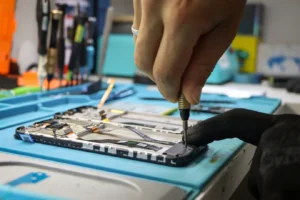
Yes. In most cases, replacing the battery solves the problem. If the swelling has cracked the screen or back glass, those parts may need replacing too. We check the whole phone and tell you before doing any extra work.

We replace batteries in iPhone, Samsung, Google Pixel and MacBook devices. Laptops can swell too, which often shows as a trackpad that will not click. See our laptop overheating guide.

Frequently asked questions

Is a swollen phone battery dangerous?

It should be treated seriously. Stop charging the phone, do not press on it or puncture it, and get it checked as soon as possible.

Can I keep using a phone with a swollen battery?

It is not recommended. The swelling can crack the screen or back and the battery is no longer safe to keep charging.

How is a swollen battery fixed?

The battery is replaced. If the swelling has damaged the screen or back glass, those parts may need replacing too.

Need a hand?

Visit our Home Street or Corstorphine store, book online, or check the areas we cover. We check the fault first and you see the price before any work begins.
How to Make Your Phone Battery Last Longer: 10 Practical Tips

How to Make Your Phone Battery Last Longer: 10 Practical Tips

Cracked Apple Watch Screen? Your Repair Options Explained

Cracked Apple Watch Screen? Your Repair Options Explained

Laptop Overheating? Causes, Fixes and When to Get Help

Laptop Overheating? Causes, Fixes and When to Get Help

Selling or Recycling Your Old Phone in Edinburgh: A Safe Guide

Selling or Recycling Your Old Phone in Edinburgh: A Safe Guide

iPad Not Charging? A Step-by-Step Troubleshooting Guide

iPad Not Charging? A Step-by-Step Troubleshooting Guide

MacBook Won’t Turn On? What to Try Before a Repair

MacBook Won’t Turn On? What to Try Before a Repair

Get in touch